
Slack notifications when a web page changes - How to
Topic
Want Slack notifications when a web page changes? The video below shows the whole setup in under a minute and a half: a price drop, a restock or any other update lands in your Slack channel the moment it happens. (You can also watch it on YouTube.)
Slack notifications are included for everyone, self-hosted or on our subscription, with no special "business" plan needed. A free Slack workspace is fine too.

The steps, in short
In Slack (this gives you a private address to post to, Slack calls it a "webhook"):
- Go to
api.slack.com/apps(open it here) and click Create New App, then Pick features. - Give it a name (your alerts are posted under it) and choose your workspace.
- Search for incoming and add incoming-webhook, so it can post messages.
- Click Create and Install, pick the channel for your alerts and click Allow.
- Open Incoming Webhooks in the app's menu, scroll down and Copy your address.
In changedetection.io:
- Click the bell icon (Notifications), then the Slack icon.
- Paste the three parts from the end of your Slack address into Token A, Token B and Token C. Leave the other boxes empty.
- Click Send test notification and check your Slack channel.
- Click Add to list, then Save. Done!
Where Token A, B and C come from
They are simply the last three parts of the Slack address you copied, with a / between them:
https://hooks.slack.com/services/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
Keep that address to yourself, like a password: anyone who has it can post in your channel. Slack's own guide is here: Sending messages using incoming webhooks.
What the Slack alert looks like
Every website change alert shows what happened at a glance: yellow dots are lines that changed, green dots are what they changed into, and red dots are lines that were removed.
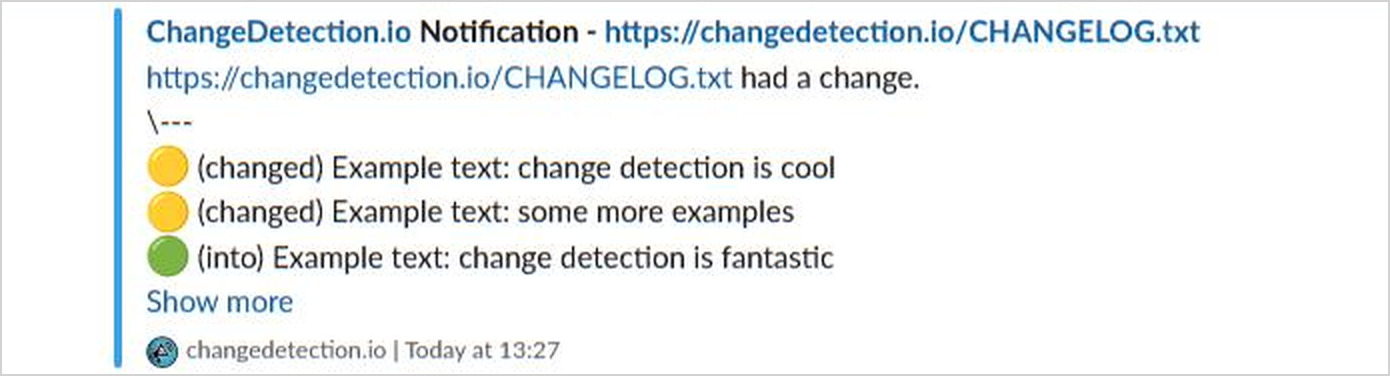
Set up this way, every web page you monitor posts its changes to Slack. Only want one page, or one group of pages? Do the same on the Notifications tab of that page or group instead.
Even better: AI summaries of page changes in Slack
A list of changed lines is great, but sometimes you just want to be told what happened. With AI Change Summary switched on, your Slack notification carries a short plain-English summary of the change instead of the raw lines, something like "Price dropped from $349 to $279. The 'Only 3 left' banner was removed."
You don't have to change anything in the Slack setup above: once the summary is on, it takes the place of the changed lines in your notifications automatically. It's bring your own key (OpenAI, Anthropic, Gemini and others) and there is no extra "AI plan". You can even tell it what you care about, like "Tell me when the price drops below $300", and only get the Slack alert when that happens. Here's how to set up AI summaries.
AI summaries and notification triggers make a fantastic addition to your team's Slack channel!
Slack integration: quick answers
How do I get Slack alerts when a website's content changes?
Add the web page to changedetection.io, connect Slack once as shown above, and every change to that page's content is posted to your Slack channel.
Does web page change monitoring need a separate Slack bot or a paid plan?
No. The Slack integration is built in. The small Slack app you created above is the notification bot, and it only has permission to post messages.
Can website change alerts go to more than one Slack channel?
Yes. A Slack address posts to one channel, so add a second address for the second channel. Both go in the Notification URL List, one per line.
For the tinkerers: write your own Slack message
You can skip this part. But if you want to decide exactly what the Slack message says, put your Slack address in the Notification URL List with posts:// at the front instead of https://, then open Customise notifications and write your message in the Notification Body:
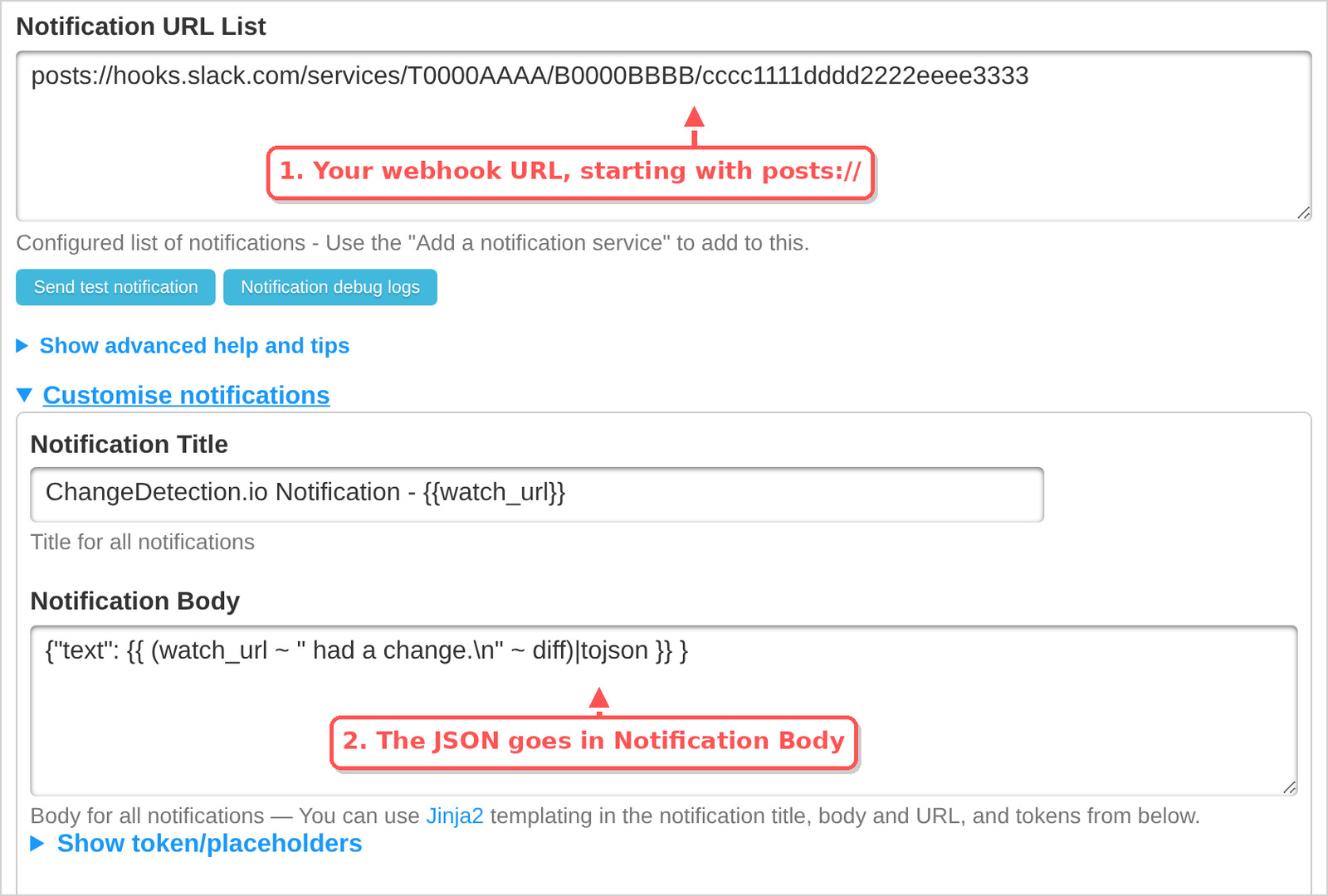
{"text": {{ (watch_url ~ " had a change.\n" ~ diff)|tojson }} }
The one thing to get right is |tojson, with no quotes around it. It wraps the page text safely, so the message still sends when the page contains quotes or line breaks. This message is used by every address in the same list, so do it where Slack is the only notification.
What's next?
- Get "back in stock" alerts for that product that is always sold out
- Monitor keywords on any website and only get pinged when they appear
- More of a Discord person? Here's the same thing for Discord alerts of page content changes
- Want it in your inbox as well? Set up an email notification when a web page changes
Don't want to run it yourself? With our subscription we watch the web pages for you, Slack notifications included.
-
Continue with

 $8.99/Month Easy Subscription
Cancel anytime, 5,000 URL watches included.