
How to track competitor website changes and prices
Subscribe to changedetection.io tutorialsEver found out a competitor dropped their price two weeks ago, from a customer? Or that the product you were both out of has been back on their shelf for days?
In this tutorial I'll show you how to track competitor website changes so you don't find out weeks later: their prices, their stock, and exactly what changed and when.
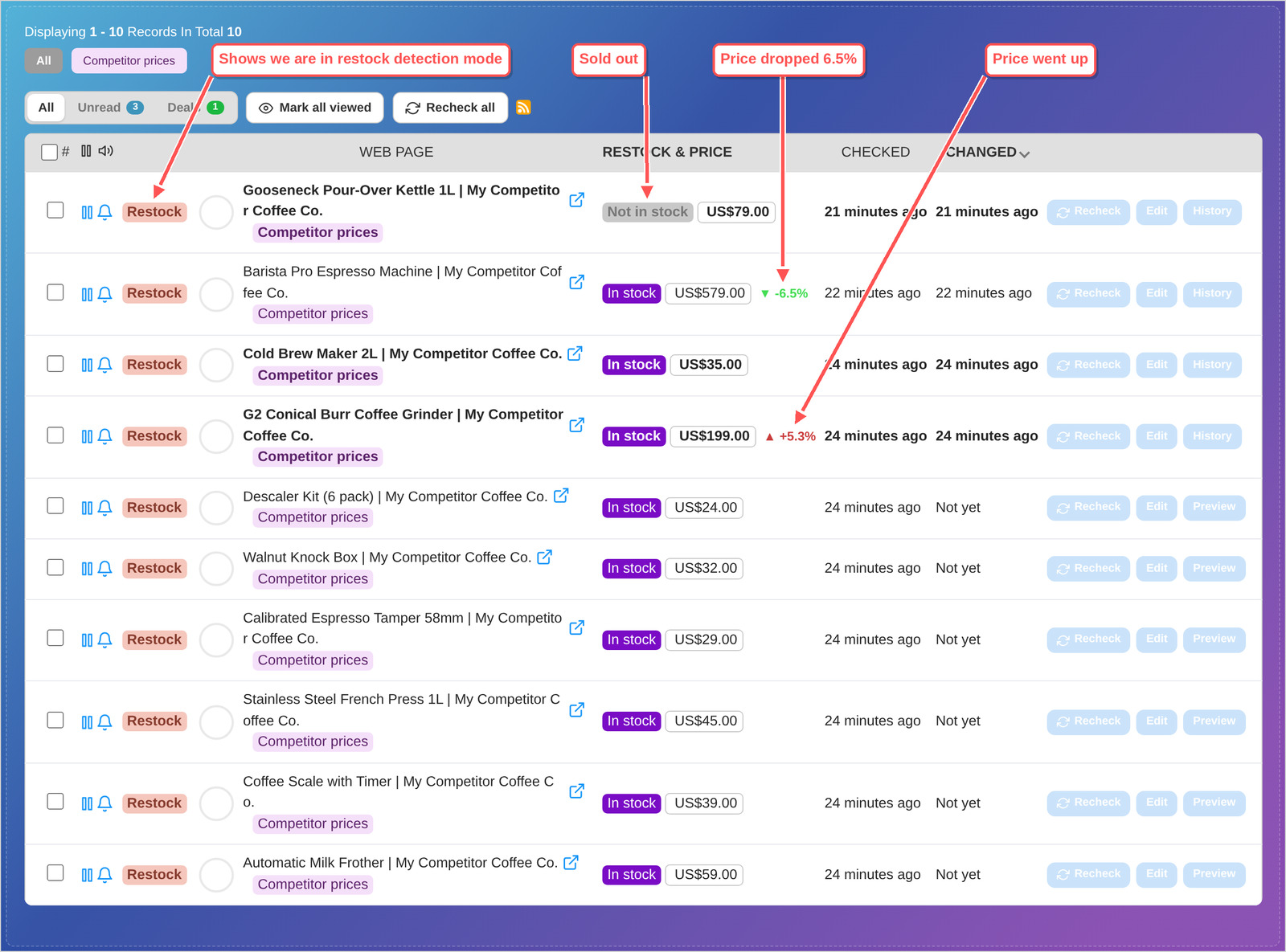
It takes about five minutes, and you don't need to scrape or crawl anything. You paste in the pages you care about and changedetection.io watches them for you.
For the screenshots I'm using a stand-in shop, www.my-competitor.com, so I can change its prices on purpose. With your real competitor it works the same way.
Step 1 - Paste in your competitor's product pages
You could add pages one at a time, but there's a faster way. Click Import in the left menu, choose Re-stock & Price detection, and paste the product pages in, one per line. Write a group name after each address (I used Competitor prices) so they stay together.
You can also import from Excel (.XLSX) - This is usually how a lot of organisations manage their data - simply click the ".XLSX" tab - You could even ask via MCP "Crawl the competitor website and add their pages to my changedetection.io dashboard"
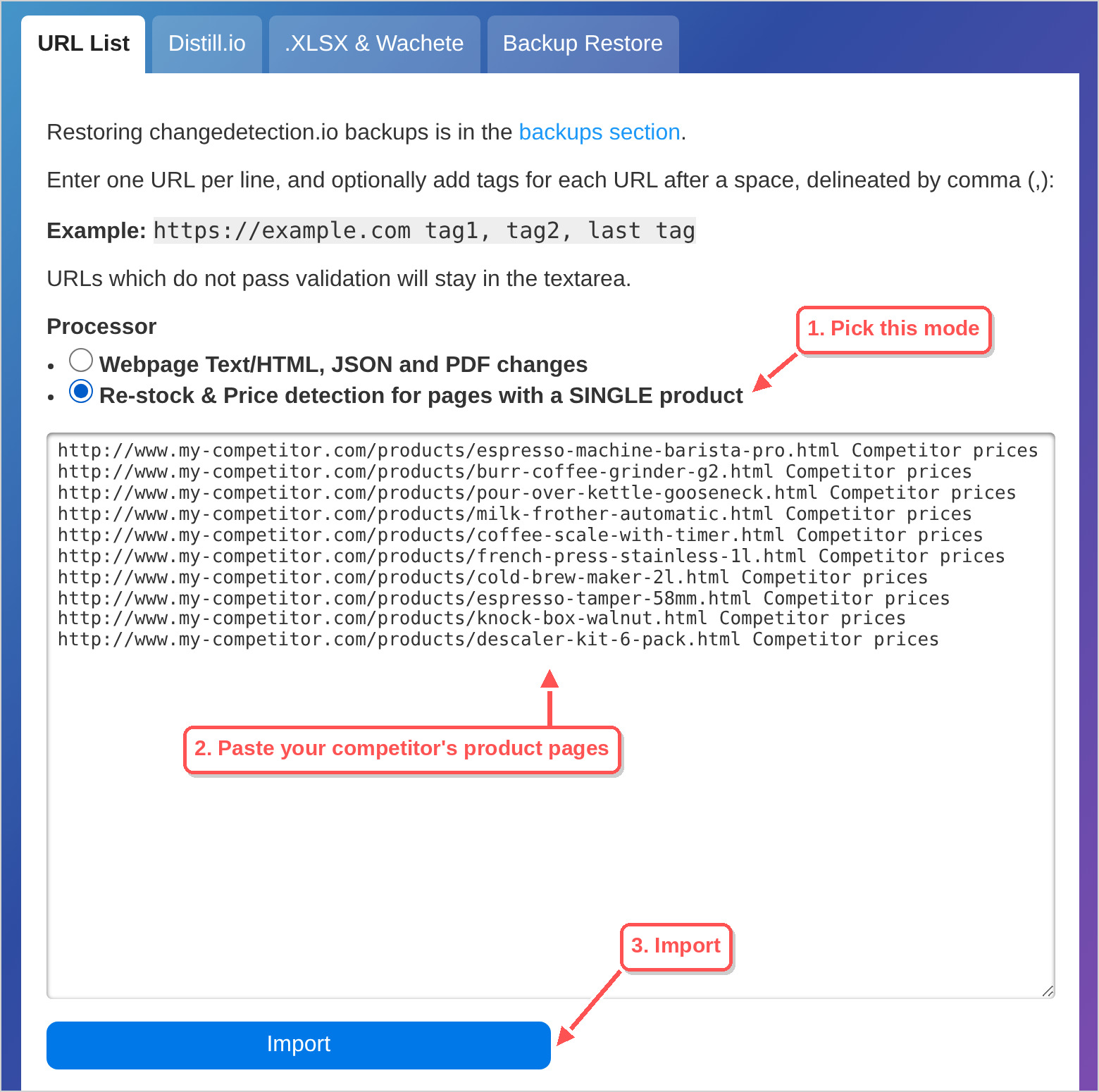
Click Import. A minute later every product shows its current price and whether it's in stock, read straight from the product page. That's your starting point for competitor price tracking: ten pages, one list, nothing to maintain.
Step 2 - See what changed and when
From now on each page is checked on a schedule. When a competitor changes a price you see it in the list, with the percentage up or down (that's the first screenshot above: one price dropped 6.5%, one went up, one product sold out).
Click History on any product and its price chart opens right there in the list. This is the part people usually miss when they monitor competitor website changes by hand: not just today's price, but what it was before and when it moved.
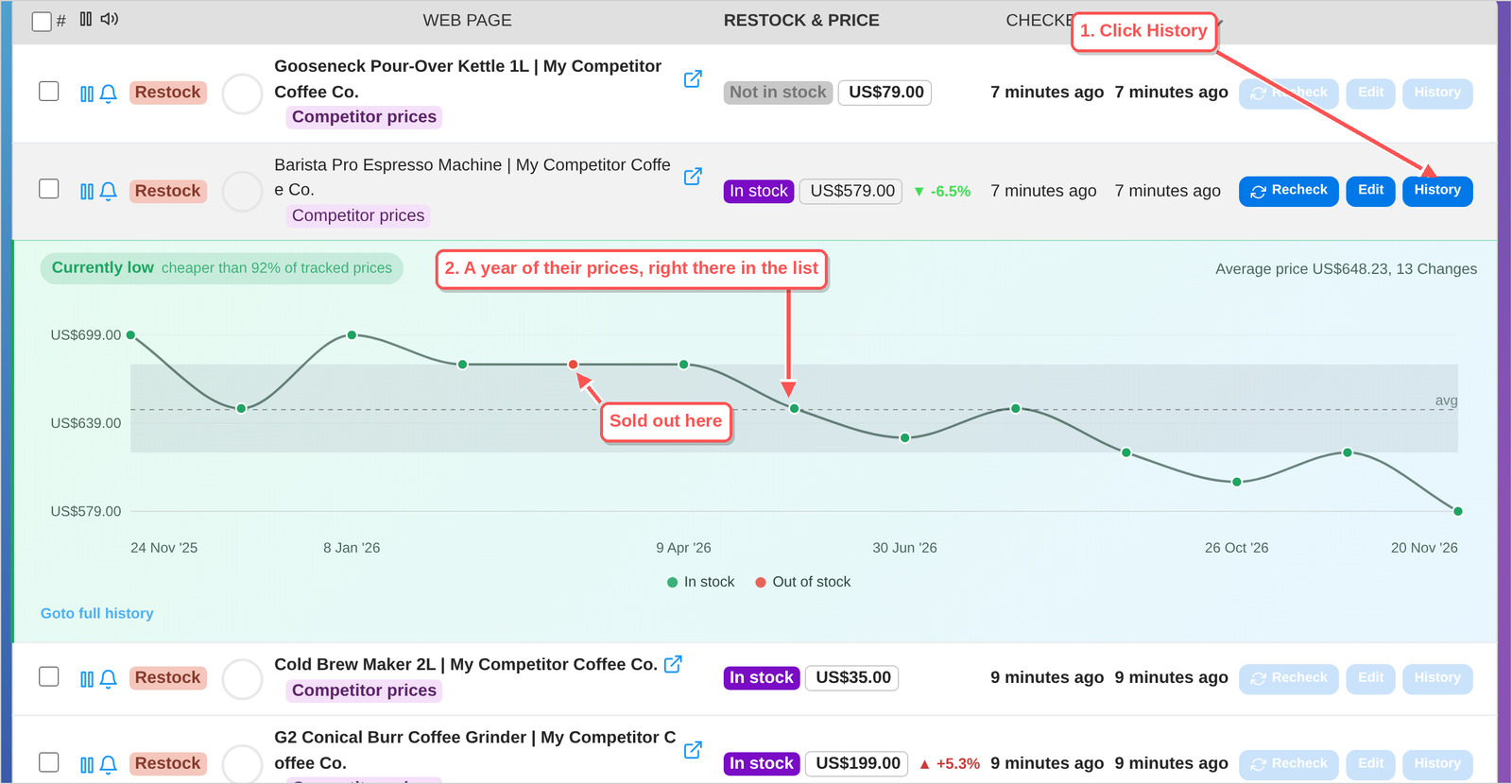
You can see at a glance when they discount, how long a sell-out lasted, and whether today's price is high or low for them (the chart says so: "Currently low, cheaper than 92% of tracked prices"). We wrote more about reading these price swings in Are you buying at the right time?
Click Goto full history for the full list of dated prices, with a Download as XLSX button if you need it in a spreadsheet for a meeting.
Download all the prices and stock as a spreadsheet
Need everything in one sheet, for a report or a weekly meeting? Tick the products you want in the list (or the box at the top to select them all) and a row of buttons appears. Click Download CSV.
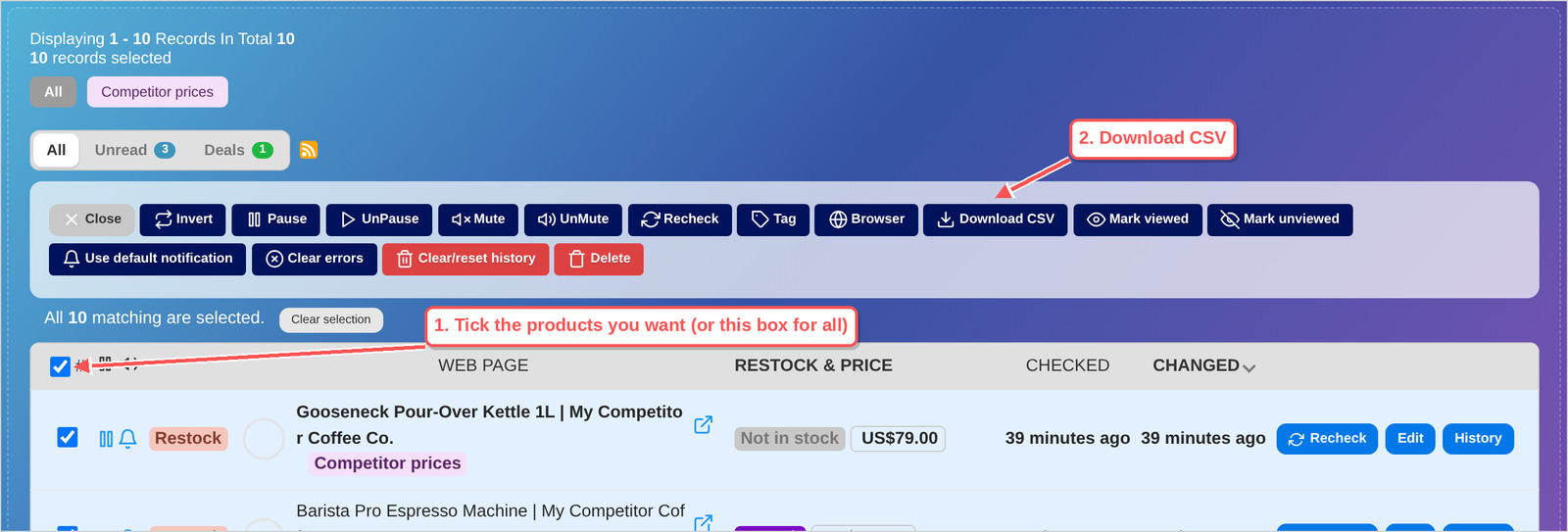
You get one row per product: its address, name, when it was last checked, whether it is in stock, the price and the currency. The first line tells you which timezone the dates are in. It opens in Google Sheets, Excel or LibreOffice:

That file is today's prices. For one product's whole price history, use Goto full history and Download as XLSX, as shown above.
Step 3 - Get an alert when it changes
Out of the box you're told when a product comes back in stock and when a price changes. For competitor monitoring you probably also want to know when they sell out, because that's your moment. Set it once for the whole group: click Watch Groups, then Edit on your group, and open Restock & Price Detection.
How quickly will you know? As quickly as the page is checked. Each page is rechecked on a timer, so an alert arrives at the next check after the change, not the very second it happens. You decide how often that is: here's how to set a checking schedule.
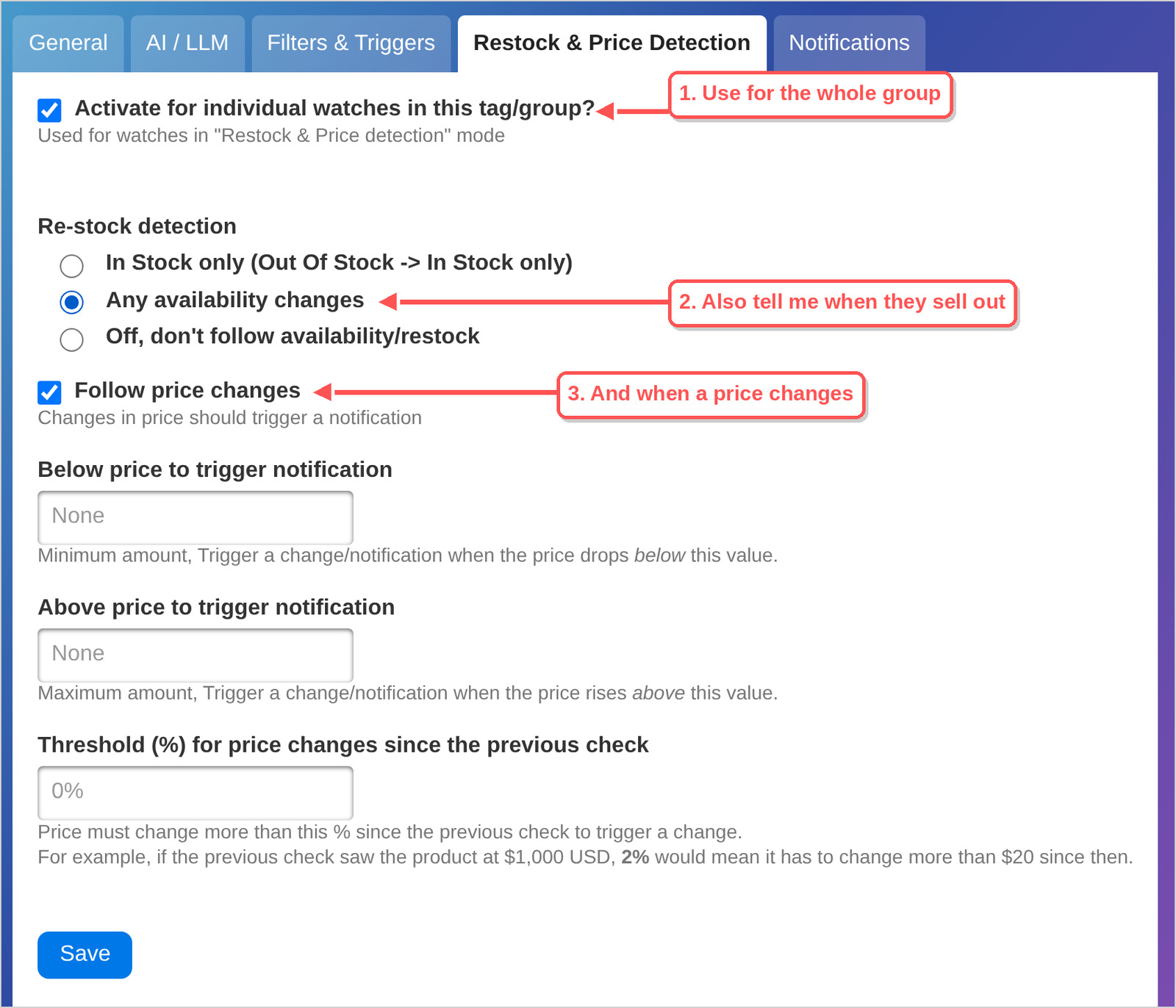
Pro tip: if small price wobbles don't matter to you, put a number in Threshold (%) on the same page and you'll only hear about bigger moves.
Then pick where the alerts go, on the Notifications tab of the same group. We have step-by-step guides for Slack, Discord and email.
Selling through retailers? Track your own products too
The same setup answers a question we get from brands all the time: "Can I track the stock levels and prices of our products across all of our retailers?" Yes. Say you have 2,000 products at 10 retailers. Paste those product pages into the import box, name a group per retailer (or per product), and you'll know when a retailer runs out of stock or moves the price by more than the percentage you set.
Let AI tell you what changed
Watching more than prices? With AI Change Summary switched on, each alert comes with a short plain-English summary of the change, and you can tell it what you care about in your own words, like "Only tell me when they change their pricing or add a new plan".
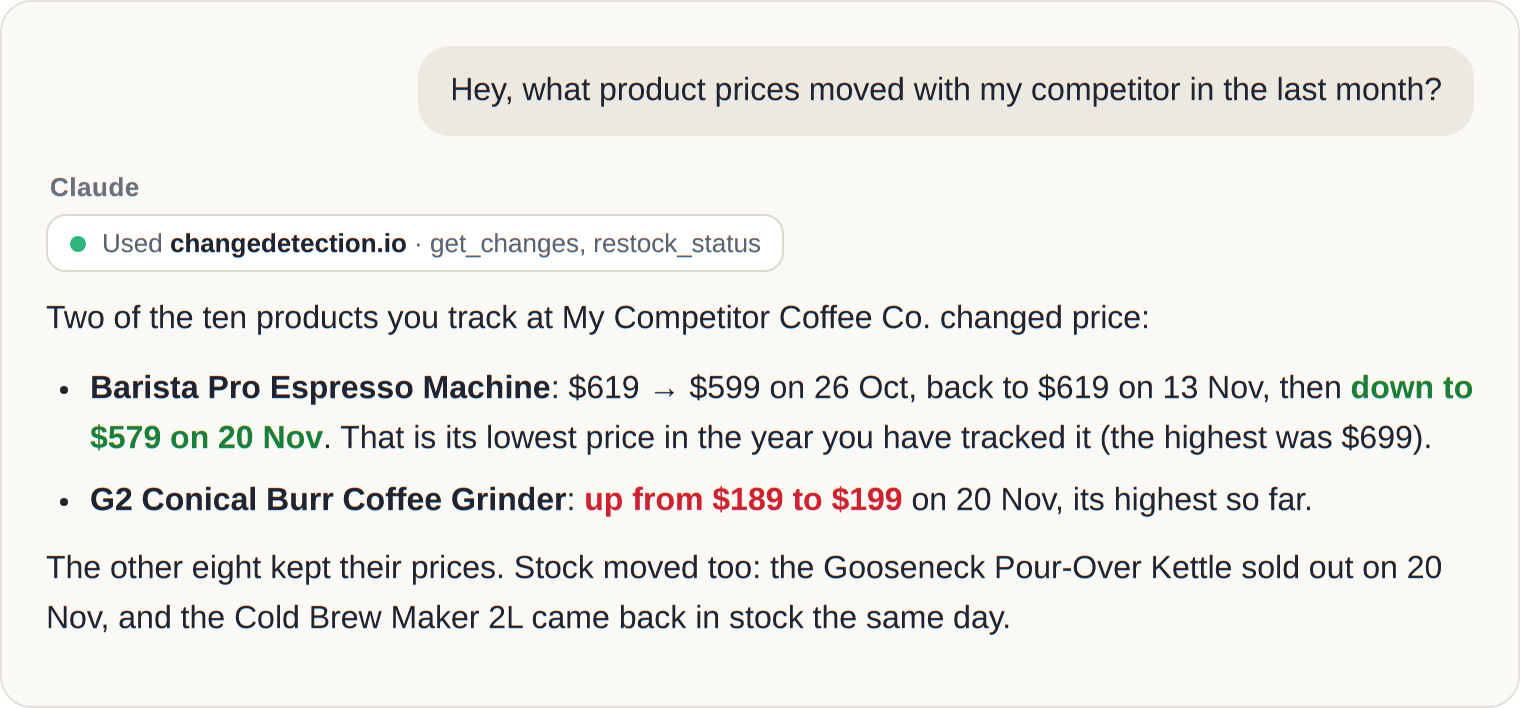
And if you use Claude or ChatGPT, you can connect them to your monitors and simply ask "Which competitor prices changed this week?". Here's how that works with MCP.
Not a shop? Track any competitor page
The same idea works for pages that aren't products: a competitor's pricing page, their feature list, their terms, their job openings. Add those pages the normal way (leave the first option selected when you import) and you get the changed text highlighted, old next to new. These will help:
- Monitor keywords on any website, to be told only when a word like "enterprise" or "discount" appears
- See a website's history of changes, to compare any two dates
What about new pages or crawling?
Everything above watches pages you already know about. If you need a whole site followed, new pages discovered automatically, a long list of retailers set up for you, or pages behind heavy bot protection (some shops block automated visitors), contact us and we'll customise a solution for you.
Are you a company that needs a reliable and integrated solution? Contact us and we'll help you set this all up and integrate it with your systems, there's more to competitor monitoring than just watching page changes, We can help you automate your whole process - tell us more!
Competitor monitoring: quick answers
How can we track what changed on a competitor's pricing page, and when?
Add the pricing page to changedetection.io. Every change is saved with its date and time, and you can compare any two versions side by side.
How do I monitor competitor product changes over time?
Import the product pages in Re-stock & Price detection mode. Each product then keeps a price and stock history you can chart or download.
Can I get alerts instead of checking by hand?
Yes. Price changes, sold out and back in stock can all go to Slack, Discord, email and 90+ other services, as soon as the next check picks them up.
Don't want to run it yourself? With our subscription we watch your competitors' pages for you, from our servers, in a few seconds of setup.
-
Continue with

 $8.99/Month Easy Subscription
Cancel anytime, 5,000 URL watches included.